
You can land softly after a fairly untidy approach. It feels good when the wheels touch down, but that little fpm number leaves out quite a lot. Were you settled on final, or still chasing the speed and lowering the gear with the runway getting rather close?
Here’s a practical look at stable and unstable approaches, using aviation guidance and examples from FlightFabric, the MSFS 2024 companion app. The app instructions were checked against 0.13.1 on 28 October 2026. The screenshot uses sample data from 0.12.7; read the assessment and criteria saved with your own flight.
What is a stable approach?
A stable approach, also called a stabilized approach, means the aircraft is established on its intended path towards the runway, at the appropriate approach speed and in the correct landing configuration. The FAA describes maintaining a consistent glidepath, airspeed and configuration towards a chosen landing point.[1]
In practical terms, you’re ready to land. That means checking:[2]
- Flight path: you are following the intended descent path and tracking the approach course.
- Speed: you are within the permitted range around the approach speed for your aircraft and conditions.
- Configuration: the required landing flap setting and landing gear position are established.
- Descent and power: the descent rate and power setting are appropriate, without large last-minute corrections.
- Preparation: the approach briefing and required checklists are complete.
Stable doesn’t mean you stop making corrections. Small adjustments are normal. Having to make substantial changes to recover the approach is the warning sign.[2]
What makes an approach unstable?
An approach is considered unstable when the aircraft doesn’t meet the required criteria. This might mean flying too fast or too slow, being off the intended flight path, or still configuring the aircraft too close to the runway.[2]
Consider two approaches in the simulator. In the first, you turn onto final with plenty of time to stabilise the aircraft, check your speed and complete the landing checklist. In the second, you’re high and fast, the landing gear comes down late, and you’re still making large pitch and power adjustments close to the runway.
Both approaches might result in a smooth touchdown, but that doesn’t mean they were equally well executed. Each tells a very different story about what happened before landing.
An unstable approach often begins well before final. Airbus highlights the importance of descent planning, managing speed and altitude, and being prepared for changes such as a shortened route. It’s much easier to correct these issues early, while you still have time and space, than to try to fix everything close to the ground.[3]
What are the 1,000-foot and 500-foot checks?
A stabilization gate is a height by which the approach must meet the required criteria. Common real-world guidance uses:[4]
- 1,000 feet above the airport in instrument meteorological conditions (IMC): cloud or visibility conditions that require flying by instruments.
- 500 feet above the airport in visual meteorological conditions (VMC): weather that meets the required conditions for visual flight.
These heights are measured above airport elevation, rather than as fixed altitudes above sea level. They are commonly used guidelines, not universal requirements for every aircraft or operation. Always refer to the stabilisation height and limits specified in the procedures you’re following.[4]
The aircraft should already be stabilised when you reach the stabilisation gate. It’s a point to confirm that the required criteria have been met, not to start getting everything into place.
And the checks don’t stop there. Changes in wind or other conditions can destabilise an approach even after you’ve passed the gate, so continue monitoring the aircraft all the way to touchdown.[3]
If it is unstable, go around
If the approach doesn’t meet the required criteria at the stabilisation gate, or becomes unstable below it, follow the go-around procedures for your aircraft and operation. Transport Canada emphasises that choosing to go around is a sign of good decision making, not poor performance.[4]
It’s worth practising go-arounds in your simulator aircraft so you’re familiar with the procedure before you need it.
After spending an hour or more flying to your destination, it can be tempting to try to make the landing work, even when the approach isn’t going to plan. But not every approach needs to end in a landing. Sometimes the better decision is to go around, give yourself another chance and return for a properly stabilised approach
A soft touchdown is only part of the story
Touchdown rate measures the aircraft’s vertical speed at touchdown, but it doesn’t tell you whether the approach leading up to the landing was stable or well managed.
Trying to make the landing exceptionally soft can also lead to floating farther along the runway. Airbus emphasises the importance of touching down in the correct area of the runway. If a normal touchdown point cannot be achieved, the recommended action is to go around.[5]
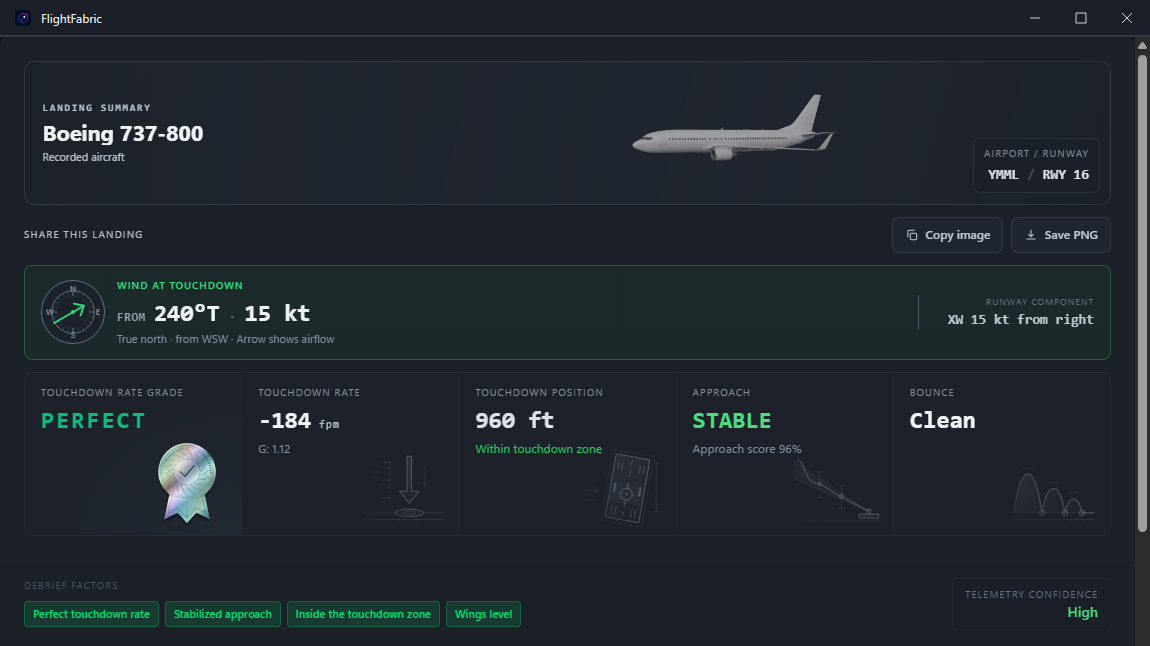
Use FlightFabric to find what to improve
After a scored landing, open the full report to review what happened. For your most recent landing, go to Overview → Last Landing → Full Report. Review the approach findings and any cautions or warnings, not just the touchdown measurements.
The percentage score is only a starting point. A high score doesn’t necessarily mean the approach was free of problems. If the recording confirms that a qualifying caution was subsequently resolved, the summary may show it as Recovered, along with the score and an explanation of what happened. The original caution will still appear in the detailed assessment. Missing data, however, doesn’t mean a problem was resolved.
Open Stability Breakdown and select an individual check to see what was assessed and the criteria used.
It’s also worth reviewing the flight profile and scoring explanation. Where available, FlightFabric uses the scoring rules saved with the original recording. Older flights may use reconstructed scoring information or have no exact criteria saved, so check what the report says about that particular flight.
An unavailable measurement doesn’t count as a passed check. It simply means there wasn’t enough information to assess it.
Finally, remember that FlightFabric’s scoring is intended as feedback for flight simulation, not confirmation that you’ve followed an airline’s operating procedures. Use the report to understand what happened and identify areas for improvement, while referring to the appropriate aircraft procedures for your next flight.
The illustration uses sample data.
Try this on your next simulator flight
- Know your criteria before starting the approach. Be familiar with the target speed, landing configuration, stabilisation height and go-around procedure for the aircraft you’re flying.
- Assess the approach at the stabilisation gate. Check whether the aircraft meets your criteria or whether you’re still trying to correct an unstable approach.
- Focus on one area for improvement. Use FlightFabric’s debrief to identify something specific to practise on your next flight. For example, you might need to allow more time to configure the aircraft before reaching final approach.
On your next flight, aim to be properly configured and stabilised on final approach. Recognise when things aren’t going to plan, and be prepared to go around rather than force a landing.
This article is intended for flight simulation only. For real-world aviation, always follow approved aircraft procedures, applicable operating rules and guidance from qualified instructors.
References and further reading
These are the sources used for the approach guidance above. They’re here if you’d like to read further.
- Federal Aviation Administration: Stabilized Approach and Landing. Plain-language definition and an accompanying safety fact sheet.
- Flight Safety Foundation: ALAR Briefing Note 7.1 — Stabilized Approach (PDF, 2000). Recommended approach elements, especially Table 1. These recommendations do not replace aircraft or operator procedures.
- Airbus Safety first: Prevention of Unstable Approaches (October 2020). Planning, early detection and late destabilization.
- Transport Canada: Stabilized Approach — Civil Aviation Safety Alert 2015-04, Issue 02 (2019). Stabilization heights, continued monitoring and go-around policy.
- Airbus Safety first: A Focus on the Landing Flare (September 2020). Touchdown position, floating and the go-around decision.